
Data Flow: Shopify Order to NetSuite Order Add
Error Code: missing_static_lookup
Error Message: 'Could not find mapping in static lookup. { Source: paymentmethodLookup} { Key: direct}'
Reason: Mappings are missing for the respective payment method.
Resolution: Be sure to map the value (Key) displayed in the error message to the desired payment method in NetSuite.
- Go to integrator.io and navigate to the Shopify Integration App Tile.
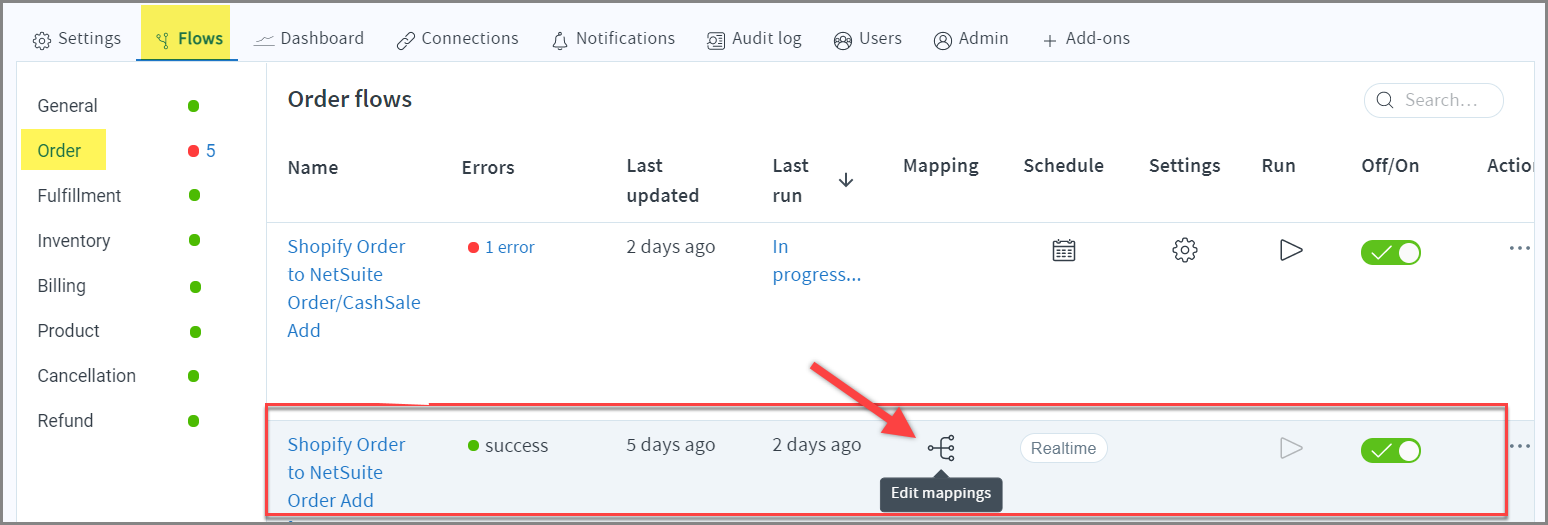
- Under Flows > Order, go to "Shopify Order to NetSuite Order Add" and click the Edit mappings icon.
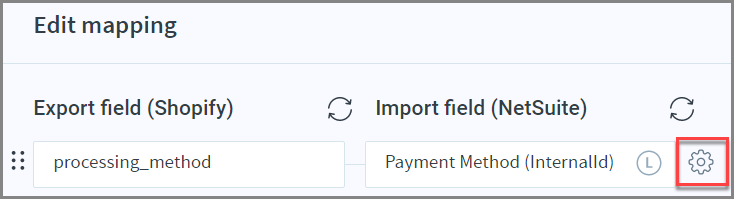
- In the Mappings section, look for the 'Payment Method (InternalId)' field, and click the gear-like icon to view the Settings page.
- Choose 'Field Mapping Type' as Lookup.
- Under 'Options', select 'Static: Value to Value'
- Under 'Export Field' enter the value of the key from the error message and choose 'Import Field' from the dropdown. - Click "Save" to save your changes.
- Click Error and Retry to re-run the Order Import flow successfully.