
Order imports into NetSuite sometimes fail when customer records with same Customer IDs are already present in NetSuite. You may see the following error:
"Failed to add/update customer for order #1xx1. A customer record with this ID already exists. You must enter a unique customer ID for each record you create. To correct this record, click and enter a new customer ID in the Customer field."
In the following example, note the field CUSTOMER ID. If another customer comes with the same name, customer creation will fail.

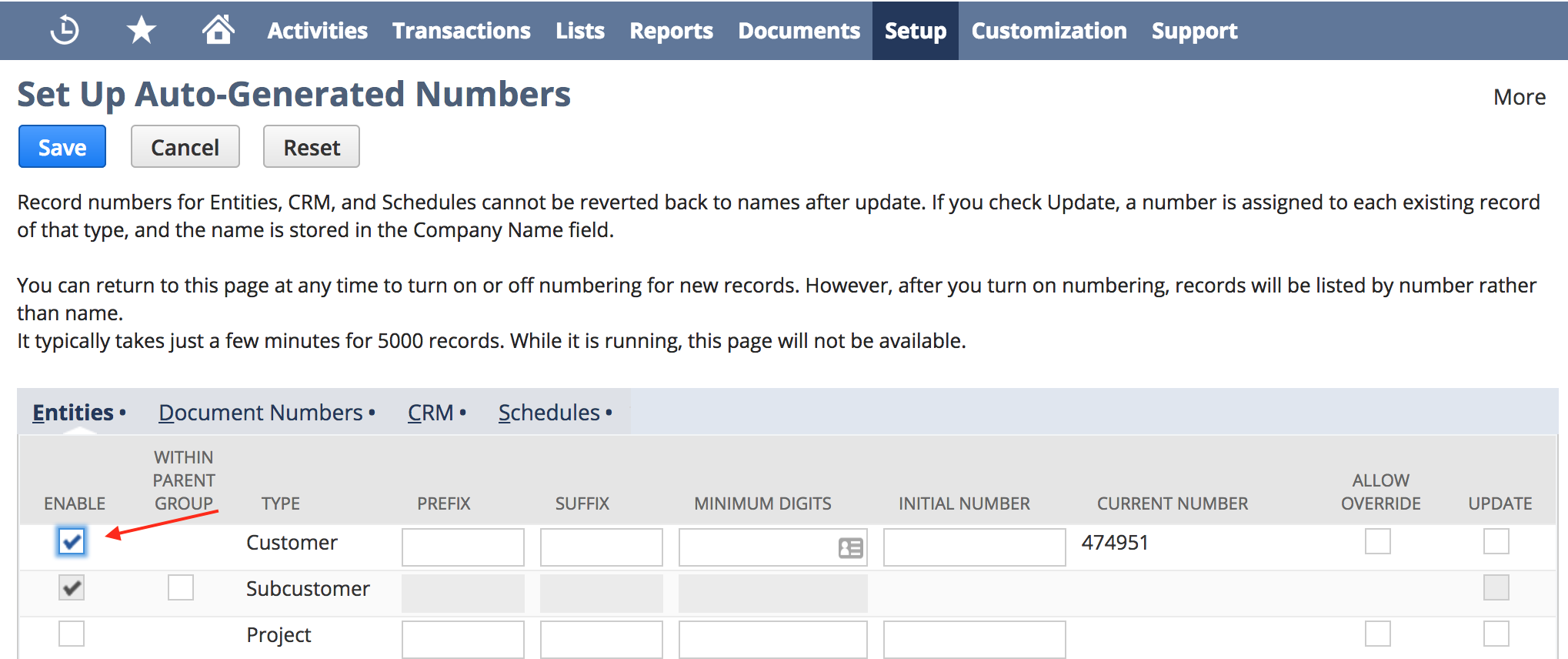
This error occurs because the Auto ID feature in NetSuite is not enabled. Note that the customer name is used to to create the Customer ID. Any time a new customer comes with a name that already exists in NetSuite, customer creation will fail. To avoid such errors, please enable the Auto ID generation feature in NetSuite.
To set up auto-generated numbers in NetSuite, go to the link ‘Set up Auto-generated Numbers’ (or click https://system.na1.netsuite.com/app/setup/numbering.nl?whence=) and provide the necessary information.
Error when the existing record belongs to the same customer
This error can also occur when the NetSuite customer that holds the Customer ID is the same customer who placed the order. The order flow first looks for the order's Shopify customer ID in the customer's Celigo Shopify Customer Id Map. If it doesn't find a match, it looks for a customer with the same email whose Shopify Store field is empty. If the existing customer has no Customer Id Map entry for your store, and it either has a Shopify Store value or a different email, the flow tries to create a new customer, and the import fails with this error. For more information, see Duplicate customer records being created in NetSuite while using the Shopify integration app.
To find which cause applies, open the NetSuite customer record that has the Customer ID shown in the error:
- If it's a different person with the same name, enable auto-generated numbers as described above.
- If it's the same person (same email or the same Shopify customer), restore the Customer Id Map entry.
To restore the Customer Id Map entry:
- In NetSuite, open the customer record.
- Go to eTail > Celigo Shopify Customer Id Map, and select New Celigo Shopify Customer Id Map.
- Enter the Shopify Customer ID, select the Shopify Store, and save the record.
- In integrator.io, retry the failed order error.
Important: Don't enable auto-generated numbers to resolve this cause. For an existing customer, it creates a duplicate customer record.